A pool stores unique codes that can be granted by a task, achievement, Battle Pass level or case prize. Creating a pool does not grant a code by itself: select it in a specific reward.
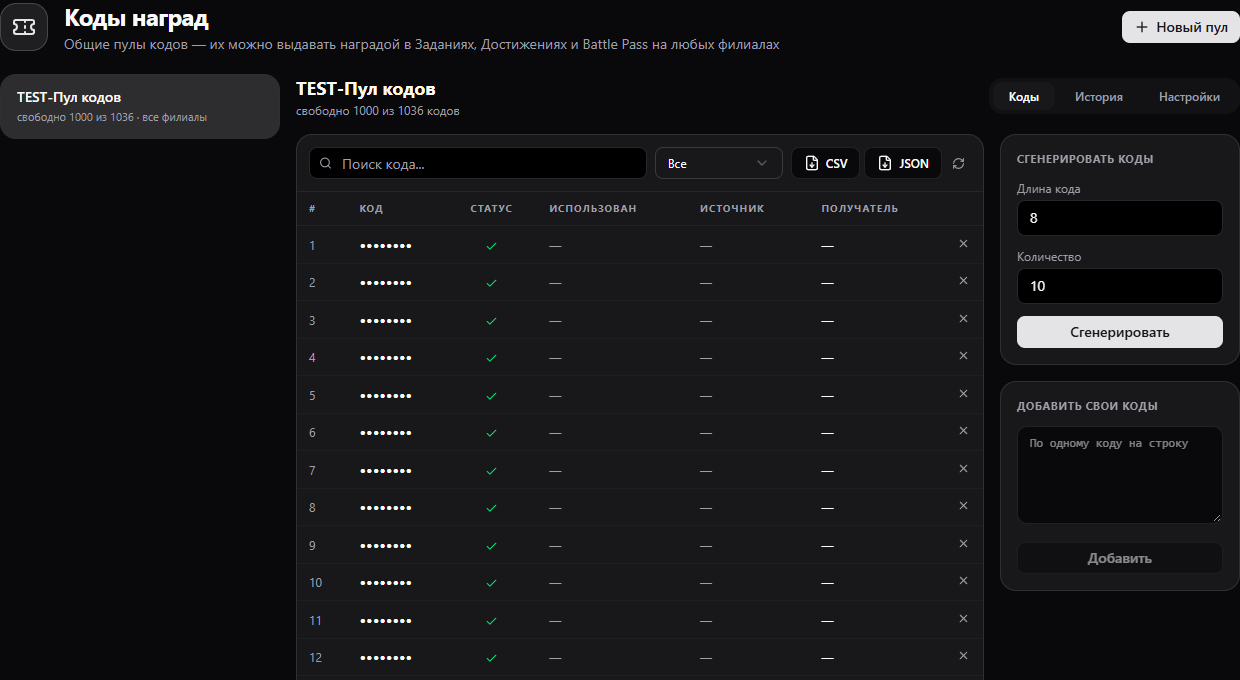
Pool fields
| Field | Meaning |
|---|---|
| Name | How staff see the pool in reward editors |
| Locations | Where grants are allowed; no selection means all locations on the same Gizmo server |
| Expiry | No new codes are granted after this date; issued codes remain in player history |
| Player note | Instructions shown with an issued code |
| Codes | One unique code per row; duplicates are skipped on import |
| Available | Stock for new grants. Zero available codes blocks grants from the pool |
Setup
- Create a pool, choose locations and optional expiry. Write a clear note, such as “Show this code to staff by 31 December”.
- Add codes one per line or generate them. Check the Available count.
- In a task, achievement, Battle Pass or case reward editor, choose Code and this pool. Make sure the pool serves the reward's locations.
- Grant a test reward. Check recipient, date and source in Codes and History; the player's Received Codes list shows the code and note.
Each code instance belongs to one player and is not returned to stock by simply viewing it. If an empty pool prevented a grant, refilling does not automatically process the earlier failed claim. Open Reward Claims → Not issued, inspect the reason and then retry. For an unknown outcome, reconcile with the player and grant log first to avoid duplicates. A case prize with no available code is excluded from its draw.