A sub-account gives a staff member access to selected clubs and actions in the GGBook panel.
Invite a staff member
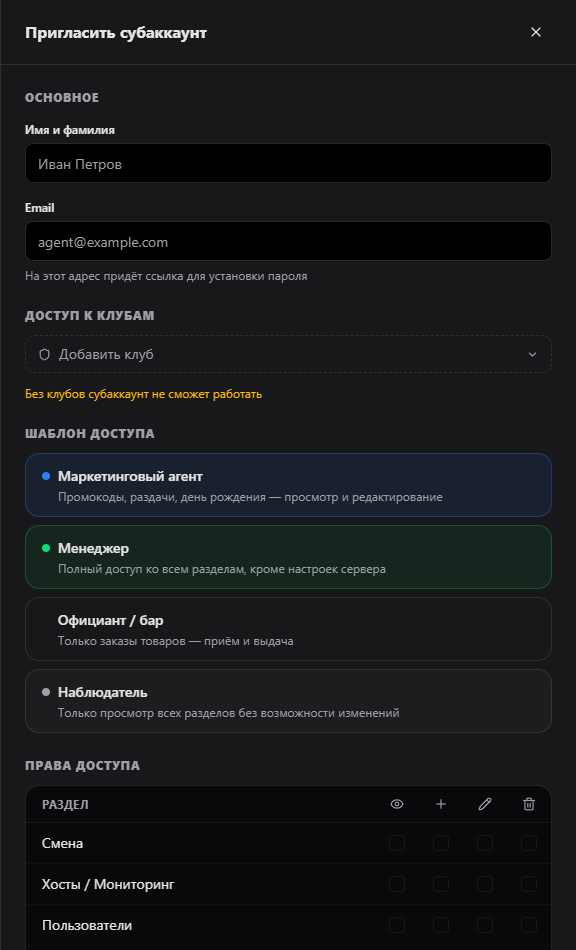
- Open Sub-accounts, select “Invite”, and enter their name and email. The staff member receives a link to set their own password; the owner does not enter a password in this form.
- Select the clubs they may access. Without a selected club they cannot work in the panel.
- Choose a template or set permissions for each section: view, create, edit and delete. “Marketing agent”, “Manager” and “Observer” are starting points that you can adjust manually.
- Review and save. You can edit the clubs and permissions later or resend the invitation.
How permissions work
Unavailable sections and buttons are hidden, and direct links and API requests are also checked on the server. Create, edit and delete permissions require view permission for the same section. Server settings, sub-account management and subscription billing remain owner-only. If permissions were saved before server-side checks were introduced, review the staff member's card against their duties and save the current set.