This is where you configure the mobile app (PWA) your players use: domain, appearance and the whole feature set.
Structure
One domain (app address) can serve several clubs. Each "domain + club" pair has its own settings: on login the player picks a club and gets its branding and features.
Main settings tabs
- Authorization — login methods (username/phone), registration, password recovery, user-group restrictions.
- Account — avatar editing, account deletion, personal data.
- Home — what appears on the home screen: balance, points, shop, monitoring, rates.
- Shop — online top-up, minimum deposit, payment methods, cashback.
- Hosts — PC map/list, host login by button or QR, a matrix of "which user group may sit at which host group".
- Information — organization details, documents, "About the club".
- Notifications — push notifications and reminders.
- Geo & taxi — the "Order a taxi" button in the player's profile (coordinates and provider are set on the "Clubs" page).
- Theme — app colors and styling.
Sites and linked clubs
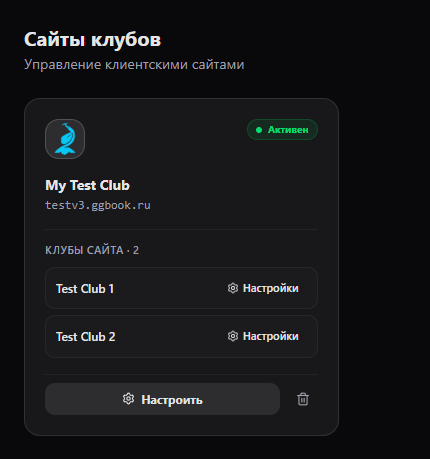
Each card under My Sites lists the clubs attached to that site. Configure on the site card opens shared site settings, including its name, linked clubs and documents. Settings beside a club opens the settings for that specific site and club pair; its app features are controlled separately.
Registration and account deletion in V3
The sign-up form reads required extra fields from Gizmo's default user group. If you change those requirements in Gizmo, the form follows them. Site registration also depends on the site switch, Gizmo settings and the registration schedule. If Gizmo requires the “State” field, which the V3 Web API cannot accept when creating a player, site registration is unavailable until that Gizmo requirement is changed.
If Delete account is enabled, players see the action in their app profile. Deletion requires the current password and a second confirmation and cannot be undone. Historical accounting and transaction records remain without a link to the player's former numeric ID.
How it works
Settings apply instantly: the app fetches its configuration on every launch, heavy data is cached for minutes. A disabled feature disappears from the app menu as soon as the player refreshes.