Connect your Gizmo V3 server to GGBook to enable locations, users, monitoring and analytics.
Before you start
- A Gizmo Web API address and port reachable from the GGBook server. A private address works when the servers have a network route; public internet access is not required.
- A Gizmo operator account with Web API access.
- The GGBook module for Gizmo V3. Support can provide GizmoV3.Plugin.GGBook.dll. Back up your server before installing or updating the module.
My Clubs → Add Club wizard
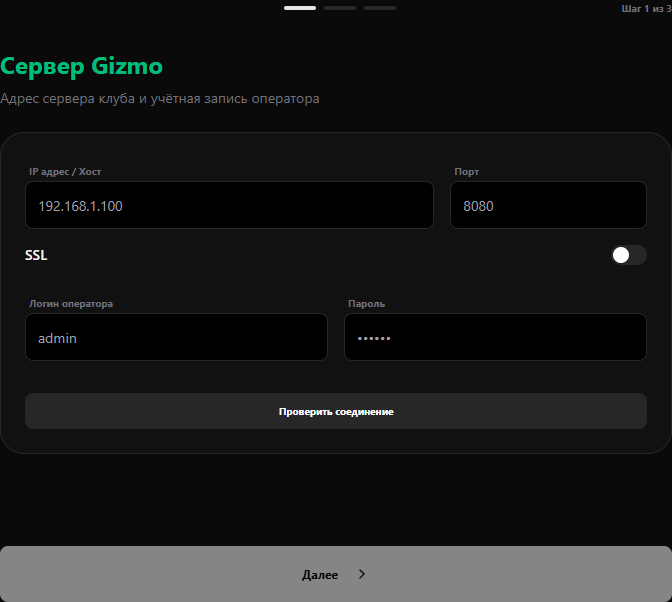
- Gizmo server. Enter the address, web port, SSL setting and operator credentials. Select “Check connection”. The wizard loads Gizmo locations after a successful check.
- GGBook module. The wizard checks the module automatically. If it is missing or outdated, follow the instructions on that step: put the DLL in plugins/GizmoV3.Plugin.GGBook, enable it in Gizmo Web Manager and restart Gizmo. You can add the server without the module, but it will appear offline and club reports and events will not work until the module is installed.
- Club information. Enter the project name, review the discovered locations and save.
If a check fails
Check the Web API address and port, SSL, the network route from GGBook to Gizmo and the operator's permissions. If the Web API works but the module is missing, check the plugin folder, its status in Gizmo Web Manager and the DLL version. Then select “Check again”.